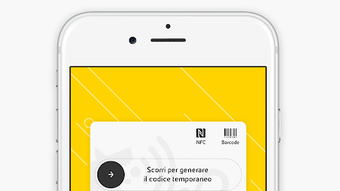

Download Eni Station APK – Eni Station app, fuel payment, car parking payment, You & Eni points, Eni Pay, MyCicero integration, Eni Station +, Eni Station app download, Eni Station + APK
Overview
The Eni Station + app is a free Android application developed by Eni, designed to streamline fuel purchasing and car parking payments at participating Eni Stations. The app enables users to make payments directly from their smartphones, reducing the need for physical transactions at fuel pumps. It also integrates with MyCicero, allowing users to pay for parking in designated blue stripe zones across supported municipalities.
A core feature of the app is the You & Eni points system, which rewards users with points for every liter of fuel purchased or for online purchases made through partner retailers. These points can later be redeemed for fuel vouchers or discount vouchers at participating partners. The app supports Eni Pay, a secure payment method that allows users to authorize fuel payments via a 4-digit secret code after refueling.
This functionality is particularly useful at Most Served or Iperself islands. The app is intended for drivers and vehicle owners who frequently visit Eni fuel stations and wish to simplify their refueling and parking processes. It is especially beneficial for those who value loyalty rewards and digital convenience.
The app was released on April 10, 2024, and is available for free download on the Google Play Store.
Key Features & Capabilities
- Eni Pay Integration: Allows users to authorize fuel payments via a 4-digit secret code after refueling at supported stations, enabling fast and secure transactions without handling cash or cards.
- You & Eni Points System: Rewards users with points for fuel purchases and online shopping with partner retailers, with the ability to earn double points per liter during promotional periods.
- Redemption of Points: Users can convert accumulated points into fuel vouchers or discount vouchers for purchases at participating partner businesses.
- MyCicero Integration: Enables direct payment for car parking in blue stripe zones across participating municipalities, simplifying urban mobility for drivers.
- Mobile Fuel Payment: Streamlines the refueling process by allowing users to pay for fuel from their smartphones after completing the refuel, reducing wait times and physical contact.
These features are particularly useful in daily urban commuting scenarios. For example, a user refuels at an Iperself island, completes the transaction, and then uses the Eni Pay tab to authorize payment with a pre-set code. Later, they can use accumulated points to receive a discount on a future fuel purchase or a voucher for a grocery store partner. Similarly, a driver in a city with blue stripe parking zones can use the app to pay for parking without needing to find a kiosk or carry cash. The app enhances convenience, promotes loyalty, and supports a digital-first approach to vehicle-related expenses.
User Interface, Workflow & Performance
The user interface of Eni Station + is designed for simplicity and ease of navigation, typical of modern Android lifestyle applications. The main dashboard likely provides quick access to key functions such as Eni Pay, points balance, and parking payment options. Navigation is expected to be intuitive, with clearly labeled tabs and icons for common actions.
The workflow for fuel payment follows a logical sequence: after refueling, users open the app, select the Eni Pay option, and confirm the transaction using a 4-digit code. This process minimizes friction and supports quick service at fuel stations. The app’s performance is likely optimized for Android devices, though specific details on CPU or RAM usage were not provided.
The developer did not specify resource usage details. General software behavior patterns suggest stable operation under normal conditions, with minimal lag during standard tasks such as checking points or authorizing payments. The app appears to function reliably in background mode, allowing users to receive notifications about point accruals or promotions.
No reports of crashes or instability were mentioned in the provided information. Overall, the app is structured to support efficient, low-friction interactions aligned with mobile payment expectations.
Compatibility & System Requirements
Eni Station + is designed for Android devices and is compatible with the latest versions of the operating system. The app is available in version 3.10.0 and has a file size of 45.3 MB, indicating a lightweight installation. The developer did not specify exact system requirements, including minimum Android version, RAM, or storage needs.
Compatibility information was partially provided, focusing only on the Android platform. Users should ensure their device meets general Android app requirements to install and run the application. The app is distributed through the Google Play Store, which handles compatibility checks during installation.
No information was provided about support for tablets, wearables, or other Android-based devices. The app is intended for use on smartphones and may not function optimally on larger screen devices. Users are advised to check the Play Store listing for updated compatibility details.
Pros and Cons
Pros
- Free to download and use, with no upfront cost for core features.
- Eni Pay offers a fast, secure method for fuel payments after refueling.
- Points system encourages repeat usage and rewards loyal customers.
- MyCicero integration simplifies parking payments in urban areas.
- Supports digital convenience and reduces physical interaction at fuel stations.
Cons
- Currently available only for Android, limiting access for iOS users.
- Points redemption and partner availability may vary by region.
- Requires an active internet connection for most features.
- Full functionality depends on being near a participating Eni Station or municipality.
- No information on offline usage capabilities or data privacy policies.
FAQ Section
Is Eni Station + available for iOS devices?
The app is currently available only for Android. No information was provided about iOS compatibility.
Can I use Eni Station + without an internet connection?
Most features require an active internet connection. Offline usage capabilities were not specified.
How do I earn You & Eni points?
You earn points by purchasing fuel at participating Eni Stations or making online purchases through partner retailers. Double points may be available during promotional periods.
Is Eni Pay secure?
Eni Pay uses a 4-digit secret code to authorize payments, which enhances security. No further details on encryption or data handling were provided.
Do I need to register to use the app?
Yes, registration is required to access core features such as Eni Pay, points tracking, and parking payments.
Final Thoughts + CTA
Eni Station + delivers a focused and practical solution for drivers who frequently refuel at Eni stations and need a convenient way to manage fuel and parking payments. Its integration of Eni Pay, the You & Eni points system, and MyCicero makes it a valuable tool for urban drivers seeking digital efficiency and rewards. While limited to Android and dependent on regional availability, the app provides a seamless experience for its target users.
The free access model enhances its appeal, and the combination of loyalty incentives and payment automation adds tangible value. For anyone who regularly visits Eni Stations, the app offers a modern, streamlined alternative to traditional refueling and parking methods. Download Eni Station + now to simplify your driving experience and start earning rewards with every fuel purchase.







